
Jump to content


Photo

Posting Images

A guide for new users.

15 replies to this topic

#1 SHADOW HUNTER ALPHA

SHADOW HUNTER ALPHA

    Member

  • Members
  • 1,116 posts

Posted 03 July 2007 - 12:26 AM

Carbon already did a Search guide, and since this is a FAQ among many new users, I figure that it would be helpful to have one link for this instead of explaining every time. Spectre's guide was in Site Feedback, not a much-frequented area, and it lacked illustration or clarity.

Step 1

Take the pictures you want and load them onto your computer from your camera (assuming that you were smart enough to use a digital camera. That shouldn't be a problem, though.)

Step 2

Create an account at Photobucket for free. They will host images for free so you can post them here.

Posted Image

Step 3

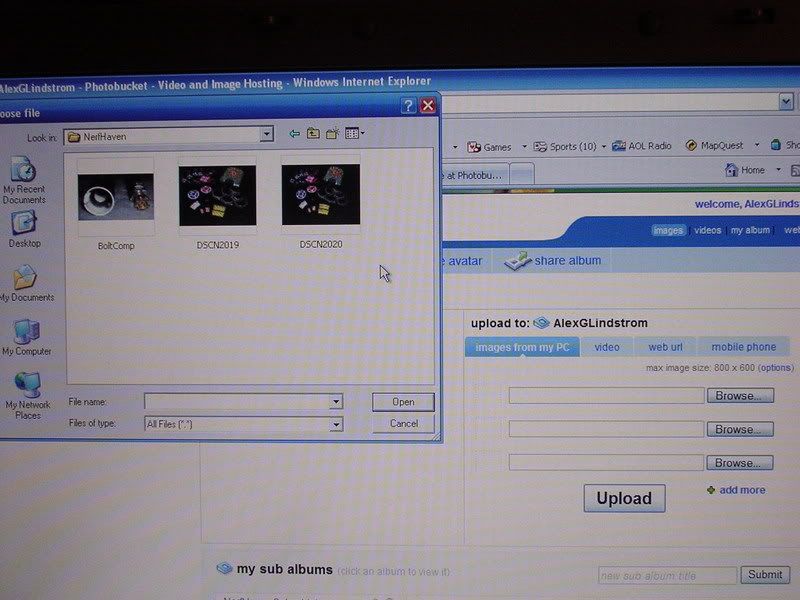
Sign in to your new account. From there, find the page with the option to upload pictures to Photobucket. use the browse button to find the picture you are looking for. Queue up to three pictures at a time and hit "Upload".
Posted Image

Step 4

Wait for the images to finish uploading. When the process is completed, scroll down to your newly loaded picture.

Posted Image

Step 5

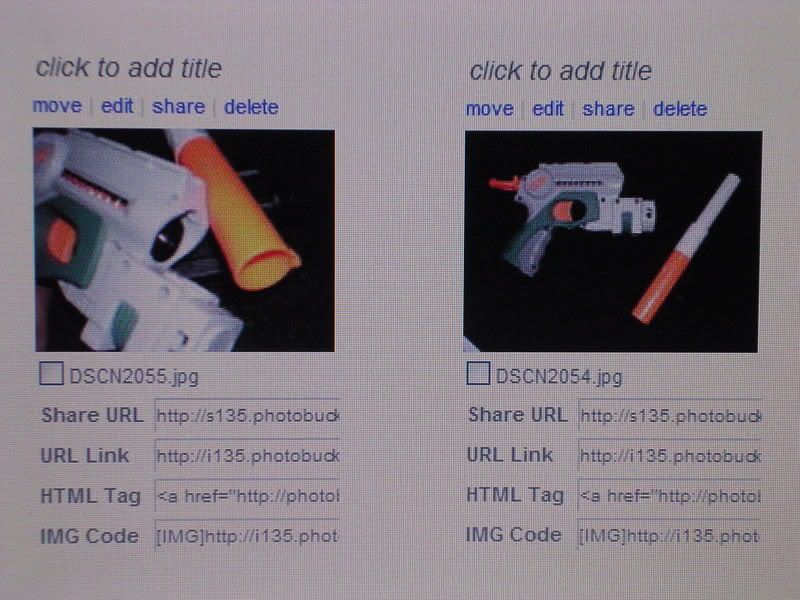
Copy the second URL tag under your desired image by clicking on the words "URL Link."
Posted Image

Step 6

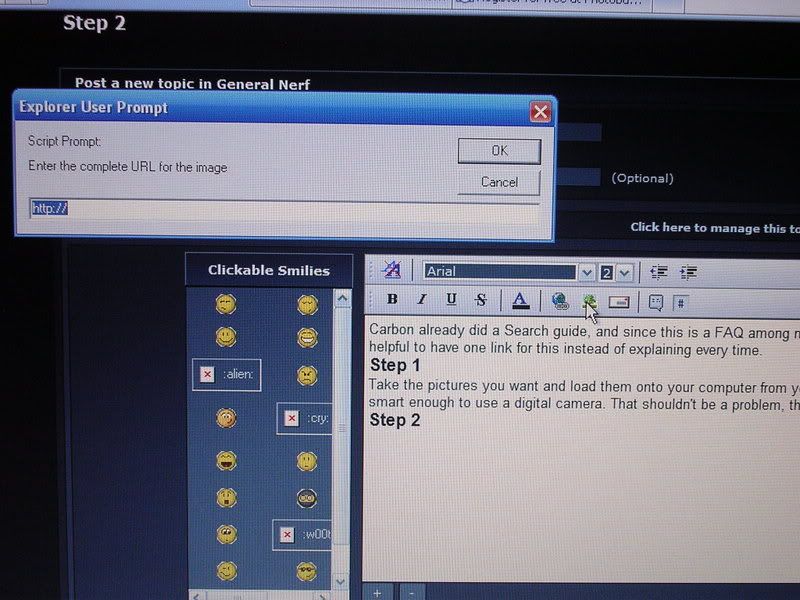
While posting, click the button that looks like a tree. This will open a scripted window asking you for the URL code you just copied, which you will paste OVER the existing contents of the input field. Hit "OK."
Posted Image

Step 7

Manually resize the image as needed by grabbing and dragging the boxes lining the picture's border. Continue typing your post, repeating steps five and six as necessary.

Step 8

Post your work.

This is ideal for write-ups, which usually require many images, although you are restricted to posting ten pictures per post. Have fun.
P.S.: Other image hosting sites may be substituted for Photobucket, but in my own experience, Photobucket is easier and faster to use.

Edited by SHADOW HUNTER ALPHA, 03 July 2007 - 12:43 AM.
  • 0
The only commonly shared fate among us all is death. I turn to the shadows so that I may not be unfamiliar with hell's corridors when I arrive. - SHADOW HUNTER ALPHA

Founder of the Shadow Militia.
Founder of Nightshade Laboratories and The Nightshade Armament Corporation.

#2 badger

badger

    The Walking Nerf-wiki

  • Members
  • 1,171 posts

Posted 03 July 2007 - 12:35 AM

There is already a topic on this in Site Feedback.

http://nerfhaven.com...?showtopic=1497

It may be old, but it still explains it. Yours is a little better as it includes screenshots, but you may also want to recommend other photo servers since some people don't use or want to use PhotoBucket.
  • 0
As Carbon once said,

"The moment you can no longer see the fun in running around like a little child is the moment you begin to die."

Roses are FF0000
Violets are 0000FF

ALL YOUR BASE ARE BELONG TO US

#3 Axelion burnout

Axelion burnout

    Member

  • Members
  • 292 posts

Posted 03 July 2007 - 12:37 AM

This should help some people out with their troubleshooting problems because they never seem to have pictures to explain their problems with.

Oh, and its way easier just to hit the "Print Screen" button and then just "Ctrl +V" into a new Microsoft Paint file, instead of just taking pictures of the screen.
  • 0
\,,/(^_^)\,,/

#4 SHADOW HUNTER ALPHA

SHADOW HUNTER ALPHA

    Member

  • Members
  • 1,116 posts

Posted 03 July 2007 - 12:38 AM

There is already a topic on this in Site Feedback.

I saw that one, but it seemed vague and was harder to find in a satellite category.

A_b: That causes my computer to lock up for some reason, and I have yet to find why. As it is, I had to do it the hard way.

Edited by SHADOW HUNTER ALPHA, 03 July 2007 - 12:41 AM.

  • 0
The only commonly shared fate among us all is death. I turn to the shadows so that I may not be unfamiliar with hell's corridors when I arrive. - SHADOW HUNTER ALPHA

Founder of the Shadow Militia.
Founder of Nightshade Laboratories and The Nightshade Armament Corporation.

#5 Axelion burnout

Axelion burnout

    Member

  • Members
  • 292 posts

Posted 03 July 2007 - 12:45 AM

Well thats odd, anyways I was just telling you about that method, because taking pictures or movies of TV screens or computer screens really bugs me unless its clear... just a pet peeve.
  • 0
\,,/(^_^)\,,/

#6 badger

badger

    The Walking Nerf-wiki

  • Members
  • 1,171 posts

Posted 03 July 2007 - 12:45 AM

There is already a topic on this in Site Feedback.

I saw that one, but it seemed vague and was harder to find in a satellite category.

I just don't think that we need two topics that talk about the exact same thing, though the wording is different. As for finding it, it was on the first page of my search wne I typed in "posting pic" into the search engine.

Carbon's search guide was really needed as there wasn't a guide to explain searching in the past. Posting pics has been explained and doesn't need another articele. If anything, this topic will get people to read the older one. Maybe the admins can update it with your new instructional, though the sarcasm should be removed, in my opinion, so as to not berate a new user in case he never learned to read and didn't see the article before asking.
  • 0
As Carbon once said,

"The moment you can no longer see the fun in running around like a little child is the moment you begin to die."

Roses are FF0000
Violets are 0000FF

ALL YOUR BASE ARE BELONG TO US

#7 SHADOW HUNTER ALPHA

SHADOW HUNTER ALPHA

    Member

  • Members
  • 1,116 posts

Posted 03 July 2007 - 12:52 AM

Posting pics has been explained and doesn't need another articele. If anything, this topic will get people to read the older one. Maybe the admins can update it with your new instructional, though the sarcasm should be removed, in my opinion, so as to not berate a new user in case he never learned to read and didn't see the article before asking.

Too slow on the sarcasm thing, even though it wasn't technically sarcasm or meant to insult. Either way, I figured that this would be easier to find and easier to understand. Most members will tend to visit the General Nerf category several times per day, while only visiting the Site Feedback category once in a while. You are entitled to your own opinion and the right to express it, but I will disagree with you on some points.
  • 0
The only commonly shared fate among us all is death. I turn to the shadows so that I may not be unfamiliar with hell's corridors when I arrive. - SHADOW HUNTER ALPHA

Founder of the Shadow Militia.
Founder of Nightshade Laboratories and The Nightshade Armament Corporation.

#8 badger

badger

    The Walking Nerf-wiki

  • Members
  • 1,171 posts

Posted 03 July 2007 - 01:02 AM

In the end, you realize, neither of our opinions matter. It is up to the admins to decide whether to pin the topic or not, ignore it, or use it to update the old topic. While it is true that most new users don't really go to Site Feedback, maybe we should be directing them to where the information is, rather than changing the location to accomodate them. Things belong in a certain place. Perhaps it is time for a forum that contains all the necessary information for conducting oneself properly here at NH, but that is just the organizational tendencies that I have talking.

The Genereal Nerf forum is for discussion of nerf related topics, like videos, new products, gun detail information, and for asking questions about certain products, as well as to post deals that you may have found to help out the NIC as a whole. It isn't for psosting mods (which I have been seeeing lately), asking what one can do to a gun (also a mod question) or for posting homemade ideas (I hate being redundant). Guides that relate to NH but not to Nerf itself should be in another location.

Once again though, are opinions are just that, opinions. The admins have the final say.

Remember, opinions are like assholes. Everyone has one, but only one person can plug them and call all the shots.

Edited by badger, 03 July 2007 - 01:04 AM.

  • 0
As Carbon once said,

"The moment you can no longer see the fun in running around like a little child is the moment you begin to die."

Roses are FF0000
Violets are 0000FF

ALL YOUR BASE ARE BELONG TO US

#9 FREE RUNNER

FREE RUNNER

    Member

  • Members
  • 11 posts

Posted 03 July 2007 - 02:07 AM

Why must you use only 10 pictures per post? I looked in the Code of Conduct and in help and it has nothing about 10 pictures only per post. I have only seen a couple of members talk about it. I have a great write-up that has 20 pictures, and I haven't asked yet about the 10 picture rule. So I would like to know what to do.
  • 0

#10 General Cole

General Cole

    Member

  • Banned
  • 868 posts

Posted 03 July 2007 - 02:09 AM

Make two posts 10 pics in each.
We should stop calling out/making fun of/pissing GC off. He's actually contributed and is available for trade. He's a better than average member no doubt. Got your back Cole.
-Nerfer34

You know what... I know it's kinda late... but Props Cole.
-Baghead

#11 FREE RUNNER

FREE RUNNER

    Member

  • Members
  • 11 posts

Posted 03 July 2007 - 02:15 AM

Do you mean make two different post? Or make one post, then add a reply with the rest of the pictures? Thanks.
  • 0

#12 General Cole

General Cole

    Member

  • Banned
  • 868 posts

Posted 03 July 2007 - 02:16 AM

Numero Dos.
We should stop calling out/making fun of/pissing GC off. He's actually contributed and is available for trade. He's a better than average member no doubt. Got your back Cole.
-Nerfer34

You know what... I know it's kinda late... but Props Cole.
-Baghead

#13 frost vectron

frost vectron

    Member

  • Members
  • 526 posts

Posted 03 July 2007 - 04:17 PM

It's not a "rule" that you can only use 10 photos per post max.

It's a limitation in the forum itself. Just get around that by:

1) Making a new thread with 10 photos in the first post
2) Reply to your own thread with your 2nd post containing another 10.

Be sure to say something at the bottom of your first post that says: "Part 2 coming soon" or something, so some moron doesn't post between your parts. You can do this or post a fast reply to "reserve the spot" and simply say something like: "Space reserved for part 2 of the mod."
  • 0
Latest Modification: The Professional

"I am a leaf on the wind--watch how I soar" - Hoban "Wash" Washburne, Serenity.

#14 badger

badger

    The Walking Nerf-wiki

  • Members
  • 1,171 posts

Posted 03 July 2007 - 06:48 PM

It's not a "rule" that you can only use 10 photos per post max.

It's a limitation in the forum itself. Just get around that by:

1) Making a new thread with 10 photos in the first post
2) Reply to your own thread with your 2nd post containing another 10.

Be sure to say something at the bottom of your first post that says: "Part 2 coming soon" or something, so some moron doesn't post between your parts. You can do this or post a fast reply to "reserve the spot" and simply say something like: "Space reserved for part 2 of the mod."

You could also just post the photo as a link instead of imbedding it into the post. The limit is probably for bandwidth and memory conservation. Don't circumvent it just to have more pictures up. Post them as links. If someone wants to see the picture, they will click on the link.
  • 0
As Carbon once said,

"The moment you can no longer see the fun in running around like a little child is the moment you begin to die."

Roses are FF0000
Violets are 0000FF

ALL YOUR BASE ARE BELONG TO US

#15 frost vectron

frost vectron

    Member

  • Members
  • 526 posts

Posted 03 July 2007 - 07:14 PM

I didn't think the bandwidth would matter since the actual image is hosted on an external site other than NH.

I thought the 10 photo limit is to deter trolls from making posts with billions of photos in it. I could be wrong, though.

Edited by frost vectron, 03 July 2007 - 07:15 PM.

  • 0
Latest Modification: The Professional

"I am a leaf on the wind--watch how I soar" - Hoban "Wash" Washburne, Serenity.

#16 Pineapple

Pineapple

    Old-school Admin

  • Contributors
  • 1,377 posts

Posted 03 July 2007 - 11:29 PM

It's not a "rule" that you can only use 10 photos per post max.

It's a limitation in the forum itself. Just get around that by:

1) Making a new thread with 10 photos in the first post
2) Reply to your own thread with your 2nd post containing another 10.

Be sure to say something at the bottom of your first post that says: "Part 2 coming soon" or something, so some moron doesn't post between your parts. You can do this or post a fast reply to "reserve the spot" and simply say something like: "Space reserved for part 2 of the mod."


Don't worry. If someone immediately posts something like "ooo, that's so cool!", and it breaks up the continuity of the two-post pictoral thread, most of the admins would delete it and insure continuity between the two sequential posts. So go with Frosty's suggestion. Even if you do have to "reserve" the next spot, then edit the post.


The 10 picture per thread post limit is instituted so as not to excessively tax the photo gremlins that live and work so hard in each NerfHaven member's computer. More than 10 tends to make them grouchy and redirect all forum traffic to NerfOn or one of those other sites. Then you have to sprinkle salt on your monitor and sing the French National Anthem, in Chinese.


-Piney-
  • 0
-Piney- of White Dog Hobbies Armory


<!--quoteo(post=209846:date=Feb 5 2009, 06:27 PM:name=boom)--><div class='quotetop'>QUOTE(boom @ Feb 5 2009, 06:27 PM) View Post</div><div class='quotemain'><!--quotec-->
It's to bad you live in hawaii I bet there are not many wars there.Wait what am I saying<b> you live in hawaii you lucky bastard.</b>
<!--QuoteEnd--></div><!--QuoteEEnd-->


1 user(s) are reading this topic

0 members, 1 guests, 0 anonymous users